
Super File Explorer EX11.1111.11111 - Google Play
You'll be able to see results in few seconds.
Publisher Description


with advanced features like
SMB/FTP/SCP/SFTP
and cloud storage support like google drive, dropbox, one drive and box.
Free, Safe, and Simple File Explorer EX is a Super File Manager with amazing user interface and extensive functionality.
Features:
● Root, FTP, SMB, SCP/SFTP, Sqlite, Zip, Rar, 7zip explorer
● Disk Map - see which files consume most space on your disk
● Cloud storage access: Google Drive™, Dropbox, Box, One drive coming soon
● SSH File Transfer (SFTP) and SSH Shell
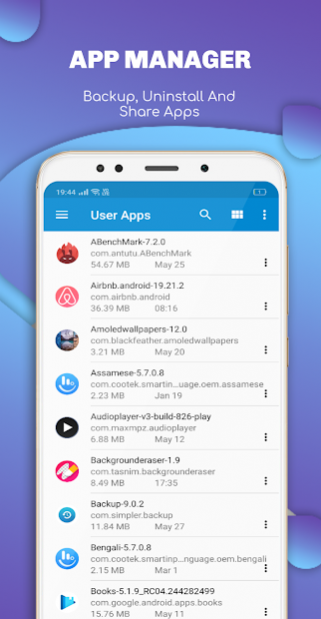
● App manager
● USB OTG
● Manage files from a PC web browser
● Favorite folders
● Built-in viewers for images, audio, text
● Video player
● Hex viewer
● Fast Image viewer with zoom and slide to previous/next images
● Thumbnails for images and video as well as for various file types (depending on associated application)
● Multi-selection - always available, yet not disturbing
● View APK files as ZIP
● Share - send files by Bluetooth, email, or whatever the device supports, from any location
● Configurable buttons and key shortcuts
● Seamless work with Zip (as if it was normal folder)
Super File manager & File Explorer Ex with inbuilt Folder Manager – Powerful tools put desktop-grade features in your pocket.
You may explore internals of the device, and if you're power user and have your device rooted, you can make changes to system data - backup files, remove unwanted applications, etc.
If you're standard user, you may choose to hide internal memory from view and be sure not to mess with system.
You can comfortably see contents of mass memories on your device, or possibly attached USB memory stick.
Simple app manager allows to see, run, copy, share, uninstall and further explore installed applications.
WiFi file sharing
Access files on your Android device from other Android devices over WiFi.
Access from a PC web browser
Manage files on your Android device from your PC.
Access to FTP and SFTP (secure FTP) servers is supported.
Multiple servers may be configured.
Root Explorer
Browse Root folder if you have rooted android device or superuser access.
Languages Supported by our file explorer es (spanish), de (german), ko (korean), ru (russian), fr (french), it (italian), hi (hindi), th (thai), pt (portuguese), vi(vietnamese) and many more
If you have any suggestions for improvements or just want to get in touch please reach out to us at our support email
About Super File Explorer EX
The company that develops Super File Explorer EX is KShark Apps Pvt. Ltd.. The latest version released by its developer is 11.1111.11111.
To install Super File Explorer EX on your Android device, just click the green Continue To App button above to start the installation process. The app is listed on our website since 2020-03-29 and was downloaded 0 times. We have already checked if the download link is safe, however for your own protection we recommend that you scan the downloaded app with your antivirus. Your antivirus may detect the Super File Explorer EX as malware if the download link to com.superfilemanager.esexplorer.exfileexplorer is broken.
How to install Super File Explorer EX on your Android device:
- Click on the Continue To App button on our website. This will redirect you to Google Play.
- Once the Super File Explorer EX is shown in the Google Play listing of your Android device, you can start its download and installation. Tap on the Install button located below the search bar and to the right of the app icon.
- A pop-up window with the permissions required by Super File Explorer EX will be shown. Click on Accept to continue the process.
- Super File Explorer EX will be downloaded onto your device, displaying a progress. Once the download completes, the installation will start and you'll get a notification after the installation is finished.
Program Details
System requirements
Download information
Pricing
Version History
version 11.1111.11111
posted on 2020-03-29
v11.111.11111
- Bug Fixes
- Smaller app size ~ 7 mb
- SMB, SCP/SFTP Connection
- Dropbox, Google Drive, OneDrive, Box access
- Light/Dark/Black Themes
- Inbuilt Video player, Image viewer, Music player
- Database Viewer
version 11.1111.11111
posted on 2020-03-29
v11.111.11111
- Bug Fixes
- Smaller app size ~ 7 mb
- SMB, SCP/SFTP Connection
- Dropbox, Google Drive, OneDrive, Box access
- Light/Dark/Black Themes
- Inbuilt Video player, Image viewer, Music player
- Database Viewer
Disclaimer
Official Google Play Link
We do not host Super File Explorer EX on our servers. We did not scan it for viruses, adware, spyware or other type of malware. This app is hosted by Google and passed their terms and conditions to be listed there. We recommend caution when installing it.
The Google Play link for Super File Explorer EX is provided to you by apps112.com without any warranties, representations or guarantees of any kind, so access it at your own risk.
If you have questions regarding this particular app contact the publisher directly. For questions about the functionalities of apps112.com contact us.
